 The Food Safety App
Running the pack for more than one establishment
Two cafes and a unit at a market are three food businesses as far as the register and your council are concerned, and three separate SFBB packs. The awkward part of running them is not the paperwork for any one of them, it is knowing on a Tuesday afternoon which of the three has actually done its checks.


Free to use. No ads, no paywalls.
One account holds as many businesses as you run. Each one is claimed separately, keeps its own pack, and exports on its own, because a council inspects a premises rather than a company.
What is separate, and why that matters
Everything that belongs to a premises belongs to that premises:
- Its own daily diary, so a quiet Monday at one site is not a gap at another.
- Its own fridges and freezers, named as that kitchen names them.
- Its own safe methods and completion record, because the method for a sandwich bar is not the method for a grill.
- Its own team, so a manager at one site cannot sign records at another. Sharing a pack is its own subject.
- Its own checklists.
- Its own export, which is the one an officer asks for when they walk into that address.
That separation is the point rather than a limitation. A single merged diary across three kitchens would be useless to an inspector standing in one of them, and the inspection pack is produced per site for exactly that reason.
A list that tells you where you stand
The app opens on one of your businesses, on its Today screen, and the others are one control away: More shows which business you are in, with its rating, and a Switch beside it.
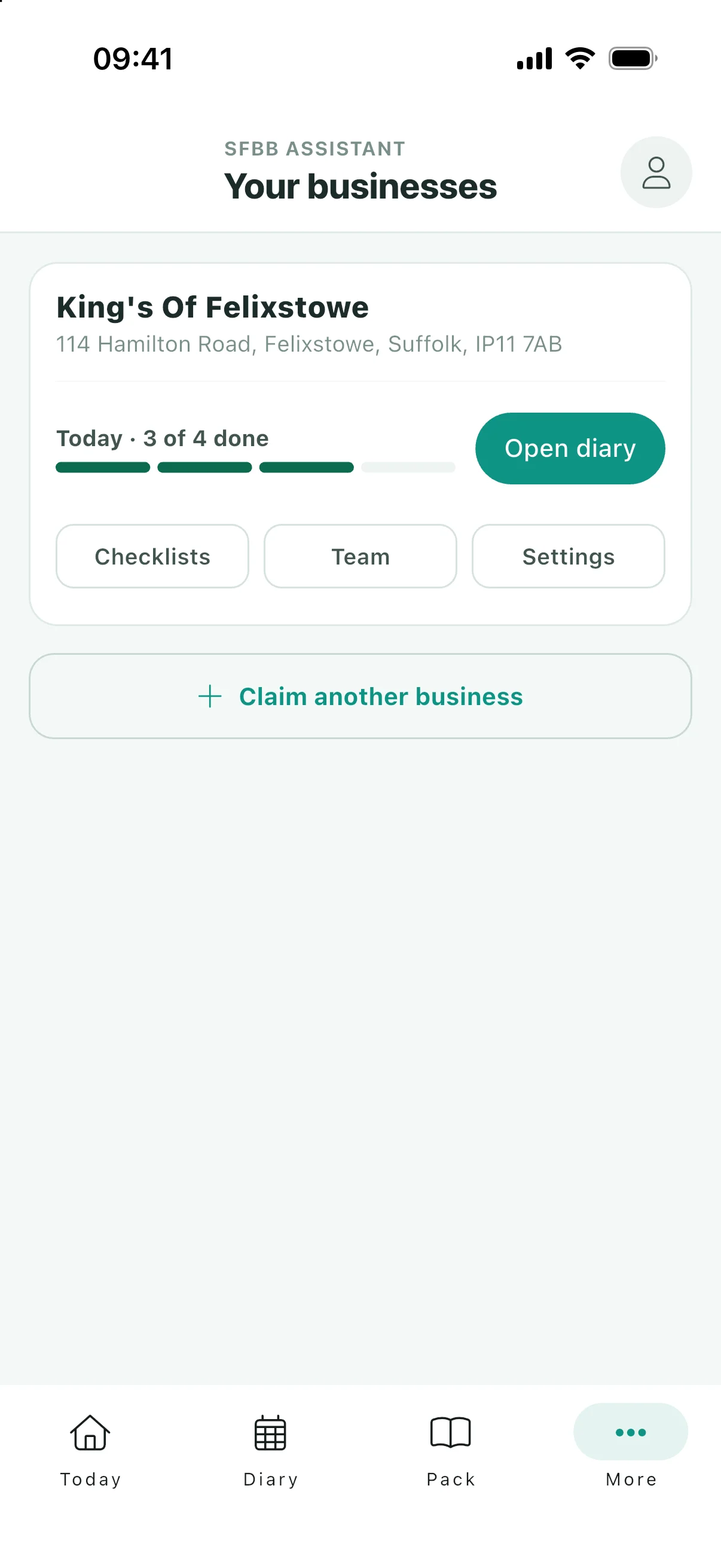
Switch opens "Your businesses", one card per establishment showing how today is going. A card reads Today · 3 of 4 done, or Today · nothing recorded yet, and that second one is the whole reason this page exists.
With one site you know whether the checks are done because you were there. With three you do not, and the usual way of finding out is to ask somebody, which is how a site goes a fortnight without a fridge temperature while everyone assumes somebody else is on it.
Open a card and you are in that business: its diary, its safe methods, its settings, its team. Come back out and the others are where you left them.
Adding the second one
The same way you added the first: find it and claim it. There is a "Claim another business" button on that list for exactly this, and nothing to upgrade or pay for, because the app is free with no paid tier and that does not change when you add a second kitchen.
A business you run that is not on the register yet can still be set up, so a new unit does not have to wait for its first inspection before it starts keeping records.
Questions
Is there a limit on how many businesses I can add?
No. The app sets no cap, and there is no price that changes with the number of sites.
Can I see all my sites in one diary?
No, and that is deliberate. A diary belongs to a premises because an inspection does. What you get instead is the list, which shows today’s progress for each site side by side.
Do I have to set up the safe methods again for each site?
Yes, because the answers are about that kitchen. Two sites that work identically will have identical methods, and the second one is quicker now you know what the questions are asking, but they are separate records and an officer reads them as such.
Does each site export its own pack?
Yes, and that is the one an officer wants: the records for the address they are standing in, for the dates they ask about.
Keep reading
Three kitchens, three packs, one list
Free on iOS and Android, with no cap on sites.